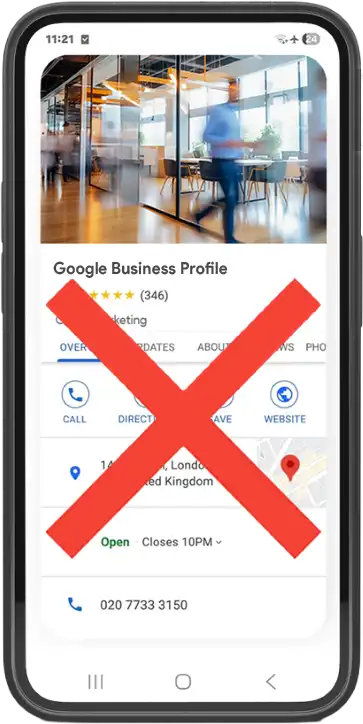
Remove your business
profile from Google!
Your Business Profile disappears completely No “permanently closed” label Cost: €349 – pay only on success
„Payment only upon success“ - The Remoovo®-Principle

Would you like your profile completely deleted so that it disappears from Google Maps permanently, along with all its reviews, rather than simply remaining “permanently closed”? Our service lets you remove your profile entirely – without affecting your website.
Many businesses struggle to delete their Business Profile completely from Google Maps. This is because Google has no simple “Delete profile” button, and many online guides do not lead to the intended result.
Below, we show you what you need to do to make your Google Business Profile disappear completely. This also works across the UK, Ireland, the rest of Europe and many other countries.
Contact us with no obligation
All reviews disappear
Once the Google Business Profile is deleted, all reviews are gone and no new reviews can be posted on Google Maps.
No “permanently closed” label
Has your business closed, or is there a duplicate listing? Instead of being marked “permanently closed”, the profile disappears completely.
A fresh start
with a new profile
If you have taken over a business, you can start afresh with a new profile – without the old reviews.
Google distinguishes between managing your profile and the public listing. That is why not every option leads to complete removal.
| Available option | What happens? | Result |
|---|---|---|
| “Permanently closed” | The profile receives a closure notice and may initially remain visible. | No immediate removal. The profile may gradually disappear from search results. |
| “Remove profile content and managers” | Management access and your own content are removed. User reviews remain, and the profile may still appear. | No, not through this step alone. Removed from your account does not mean removed from Google. |
| Request removal through Google Maps | Google checks the reason you provide, such as a business that never existed or an ineligible listing. | If the request is approved. Google decides based on the circumstances reported. |
| Ask Remoovo to handle it | Remoovo makes targeted use of the options available through Google to remove your Business Profile completely. | Profile completely removed. All reviews gone. No new reviews possible. |
These steps remove the profile from your Google Account. They are not the same as complete removal from Google Maps.
1. Sign in to the Google Account linked to the Business Profile. Click the Google Business icon (the blue shop).
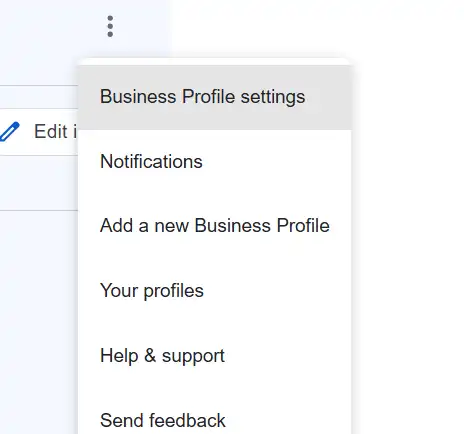
2. Open the vertical three-dot menu in the top right and click Business Profile settings
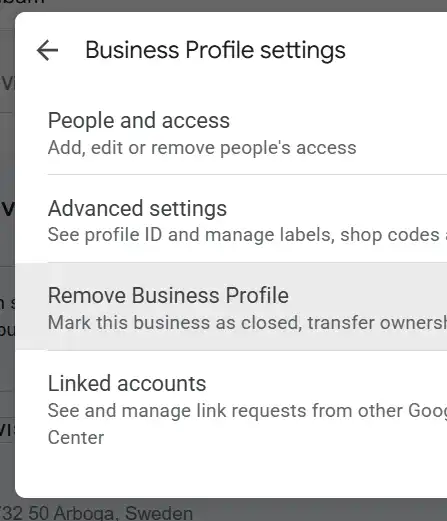
3. Next, select Remove Business Profile
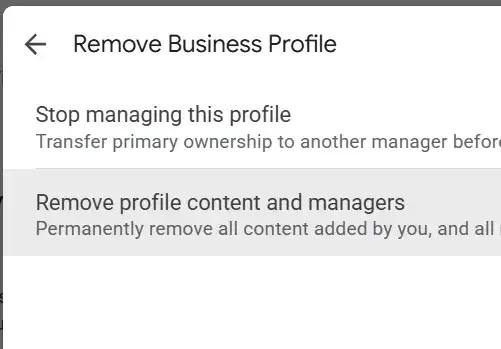
4. Then click Remove profile content and managers
5. Confirm that you want to remove all profile content and managers. Confirm by selecting “Remove”. You have now removed the Business Profile from your Google Account.
Please note: This initially removes or disconnects the Business Profile from your Google Account. It does not immediately delete the Business Profile from Google Maps. You lose ownership access and can no longer make changes. The basic profile or underlying Google Maps listing initially remains in place.
“Finally, no more Google business listing!” – Anja Cheswick of Remoovo®
Send us the link to your Google Business Profile.
We review your enquiry and handle the removal once you instruct us.
You only pay once your Business Profile has been removed.
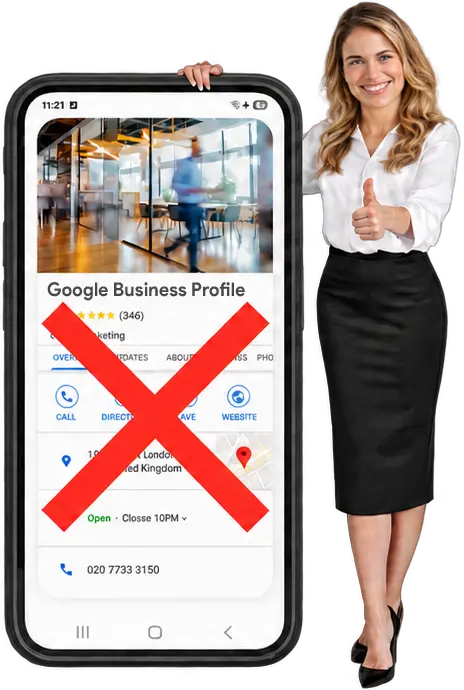
You do not have to be listed as the owner to have the profile deleted. Removal is also possible if nobody has claimed the profile yet. If you have already claimed ownership of the profile, you need to transfer primary ownership to us.
The removal concerns your Google Business Profile. Your own website, its visibility in regular Google search results and your listings in other business directories remain in place.

If the removal succeeds, all data associated with the profile is permanently deleted. The profile no longer appears in Google Search or Google Maps, and the option to leave reviews is disabled.
Removing your Business Profile does not affect your website, your reviews on other platforms or your Google ranking.
4.5 ★★★★★ (688) · €30–80 · Restaurant
12 Example Street · Open · Closes at 23:00
4.7 ★★★★★ (215) · €20–40 · Restaurant
8 Park Street · Open · Closes at 22:00
Welcome to Example Restaurant Berlin. Explore our menu and reserve your table.
An overview of the business, contact details and services.
Your local contact. Visit the business website for more information.
4.5 ★★★★☆ 688 reviews ⓘ
€30–80 · Fine dining restaurant
An upscale restaurant with a garden terrace and international cuisine.
Service options: Reservations available · Outdoor seating · Dine-in
Address: 12 Example Street, Berlin
Illustration featuring a fictional business
Send us the link to your Google Business Profile.
✓ Free and without obligation
You instruct us to proceed. We take care of the complete removal.
✓ €349 – Pay only on success
Your profile and all associated reviews are removed. No new reviews can then be posted.
✓ Usually within 24 hours
“New business, old ratings – one of those can change.” – Thomas Zell of Remoovo®
Not everyone wants to disappear from Google permanently. Some simply want a fresh start: without the previous owner’s reviews, the old business name or yesterday’s baggage. This is possible – the order of the steps is what matters.
When a fresh start makes sense
Delete first, then create a new profile – not the other way round
Do not create the new profile while the old one is still visible. Google recognises two listings with the same address and category as duplicates. In the best case, one is hidden. In the worst case, Google merges them – and the old reviews reappear exactly where you wanted to get rid of them. Wait until the old listing has disappeared completely before creating a new one.
What does not carry over to the new profile
Most people underestimate that last point. A new profile starts without a history and needs time to compete in local results again. If customers find you exclusively through Google, you should factor this in.
Verification starts again from scratch
A newly created profile must be verified like a first listing – by postcard, video or phone, depending on the business category and location. Previous verification of the old profile does not count.
When a new profile is not the answer
If your main aim is to stop receiving reviews altogether, starting again is a detour: anyone can review the new profile from day one. In that case, removal without creating a new profile achieves your goal directly. A fresh start makes sense if you want to remain visible on Google, just without the old history.
We handle the complete removal and tell you when you can safely create your new profile. We can also help you set it up. You only pay once the old listing has actually disappeared.
We can generally assess these profiles too. If an unknown third party has taken over the profile, this can make removal more difficult. Please let us know when you send your enquiry.
There is a distinction between complete deletion and removing the profile from your own Google Account. The latter always works, but it only removes your ability to edit the profile. In most cases, it is technically possible to have the business listing removed completely. There are cases where it does not work because certain requirements are no longer met.
Complete removal usually takes no more than 24 hours, and sometimes it can be done within 2 hours. This is, of course, subject to removal being possible; there is no guarantee.
With the following approaches, the business listing remains visible to everyone:
1. Marking the business as “permanently closed” . This setting simply makes customers think your business no longer exists. The Google My Business listing or Business Profile still appears in Google search results.
2. Selecting “Remove the Google Business Profile from your account”. The listing remains in place and you only lose your editing rights. This can even create a risk of someone else taking over your Business Profile.
Removal by Remoovo costs €349. This includes a further removal if the profile reappears within one year of deletion, which happens only very rarely.
Complete removal of the Google Business Profile means that your business listing disappears from the local Google Maps list and the dedicated Google Maps search results. Nobody can find you on Google Maps any more – but nobody can review you there either.
In very rare cases, the business listing reappears because someone requests it from Google. Older, overwritten listings can also become visible again when the current Business Profile is deleted. This is usually not a problem, because the older listing can generally be removed too.
Deleting the Business Profile removes all data, photos and information together with all reviews. No new reviews can be posted in future either, because the review function no longer exists.
Yes, the difference is significant. Many businesses that have their listing removed continue to operate and are not closed. “Permanently closed” is usually the most customer-friendly option if the business really has ceased trading.
No. Taking this route only removes your control over the business listing. You can no longer manage it or make changes.
In most cases, we can delete the Business Profile, formerly known as Google My Business. Occasionally, profiles are harder to remove. This may be due to a very large number of reviews or the business category; in our experience, for example, Google sometimes causes difficulties with medical practices. There is therefore no guarantee that the Google Business Profile can actually be deleted. That is why we do not advertise claims such as “works 99% of the time” or offer a guarantee – that would be both inaccurate and misleading.
No. Even with this step, it is never certain whether Google will delete the Business Profile completely. If it does, the listing usually remains visible for many weeks or even months first. If you try to remove your business yourself using common online guides, usually only the data and photos you published yourself disappear. Reviews and the ability to post new reviews remain. The basic profile can still be found, without your individual customisations.
Yes. Even if you or someone else has marked your Business Profile as “permanently closed” and you no longer have access, the profile can usually be deleted.
Removing the entire Business Profile has no effect on your website or on reviews or listings on other platforms.
Yes. The order matters: the old listing must disappear completely before you create the new profile. If both exist at the same time, you risk Google merging them as duplicates – including the old reviews.
Reviews, photos, posts and all statistics do not carry over. The new profile starts from zero and must be verified again, just like a first listing. Get in touch – we will tell you when you can safely create the new one.
In under a minute, see how removal works – from the first enquiry to the listing disappearing.
Practical tip: The more changes you make to your Business Profile, the harder it can become to remove it. Our tried-and-tested method can achieve permanent removal. It works in most cases, but of course nobody can guarantee it.
Cost: As we only charge a success fee, there is no financial risk to you.
We take care of removing your profile and all its reviews completely. Send us a no-obligation enquiry – you only pay on success.
Request removal now